
Jamf Trust - Alert

Jamf Trust: VPN Remediation
Company: Digital Convegence
Jamf Trust Access dropping shouldn’t mean silent connection loss, frustrated users, or a flood of support tickets.
This lightweight, fully automated alert workflow instantly notifies end users when their zero-trust connection fails and gives them a one-click “Enable” button to restore access — keeping your entire macOS fleet secure and productive without any extra helpdesk load.
Purpose
This alert workflow is to give users a heads up when their connection drops. When the connection drops, access to applications also drop. The zero trust rules require Jamf Trust Access to be fully functional. There is no atequate current builtin feature for this process and procedure. The current builtin feature within Jamf Trust is hit and miss. Since this can cause many support calls, a process was necessary to automate and alert users to this problem and to offer an easy corrective workflow.
Workflow
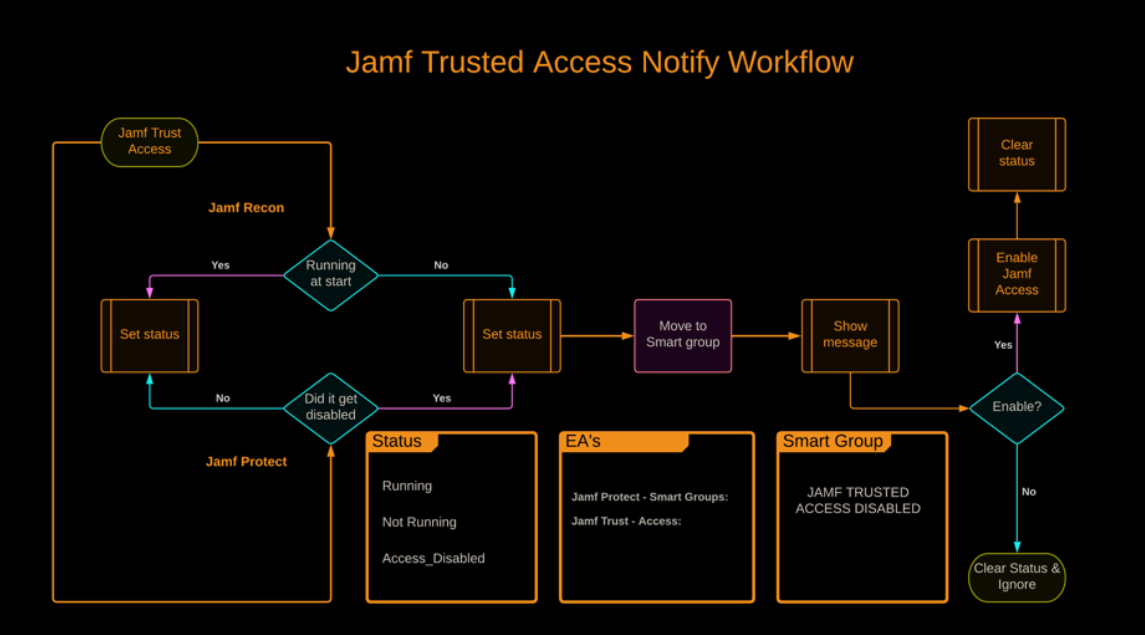
Smart Group
Jamf Trusted Access Disabled
Devices that have disabled Jamf Trust or if Jamf Trust fails will end up in this smart group.
Status for EA’s
Not Running
Jamf Protect custom analytic with smart group
The Jamf Protect agent will notify and update the smart group when the application has been disabled or has closed.
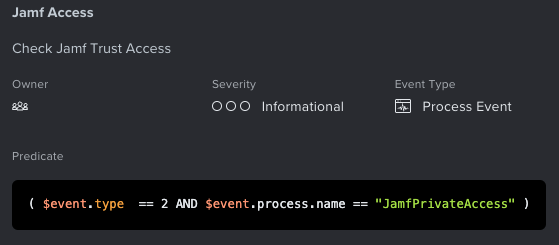

Jamf EA
EA Name: Jamf Trust - Access
During each check-in this Extension Attribute will detect if the Jamf Trust Access process is running.
#!/bin/bash
#####################################################################################
# This script detects if Jamf Trust is running at checkin.                          #
# Jamf EA : Jamf Trust - Access (string)                                            #
# Result = "Running" or "Not Running"                                               #
#####################################################################################

ProcessName=JamfPrivateAccess
number=$(ps aux | grep -v grep | grep -ci $ProcessName)

if [ "$number" = "1" ]
    then
        result="Running"

    elif [ "$number" = "0" ]
    then
        result="Not Running"

fi

echo "<result>$result</result>"

exit 0;
Jamf Helper script
Computer Management script named Jamf Access Disabled

Script will also check again to make sure that the Jamf Private Access process is active and will only notify the end user if the service is actually not running at the time the script is processing the corrective action.
End Result Alert
The popup allows the user to ignore the message, this was added to allow for a troubleshooting pathway.
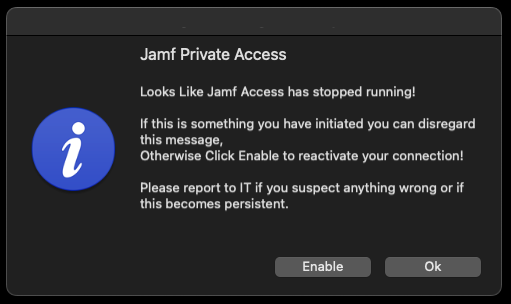
Ignoring the prompt by choosing "OK" will not clear the EA or start the Service, thus next check-in the user will be prompted to enable Jamf Trust access again!
Jamf Trust Login
This policy and script was created to aid with the issue that sometimes the Jamf Trust installer fails to create a login item, thus Jamf Trust not running at startup.
This can occur during initial install or after a major macOS update.
#!/bin/bash
#####################################################################################
# This script adds Jamf Trust as a login item.                                      #
# Jamf EA : Jamf Trust login Item creation                                          #
# Result = Creates login item                                                       #
#####################################################################################

## Current User
CURRENT_USER=$(ls -l /dev/console | awk '{print $3}')
CURRENT_USER_UID=$(id -u $CURRENT_USER)

launchctl asuser $CURRENT_USER_UID osascript -e 'tell application "System Events" to make login item at end with properties {name: "Jamf Trust",path:"/Applications/Jamf Trust.app", hidden:false}'

exit 0;
Add this to a policy that gets triggered once a week.
Resources
You should also read:

Automated Print Cost Recovery & Client Billing Integration
Print-to-Profit Solution
Company: Gold Business Technologies Ltd.
In professional services environments (particularly legal and consulting firms), printing, copying, and scanning costs represent a significant expense. Recovering these costs from clients—by accurately allocating usage to specific matters, clients, or departments—was historically manual, inconsistent, and prone to under-billing or disputes.
Continue reading...
Moneris Payment Gateway Integration for Online Invoice Payment
Drupal-Based Solution
Company: Gold Business Technologies Ltd.
Customers increasingly requested secure, non-PayPal options for paying invoices online. To meet this demand, the company selected Moneris as the payment processor. However, integrating Moneris into the existing infrastructure presented significant technical challenges due to an outdated website and legacy systems.
Continue reading...
Lottery Terminal Field Update & Rescue Toolkit
Custom Live Linux Distribution
Company: NCR Canada Ltd.
In the era before widespread high-speed internet, updating lottery terminal firmware or gaming software was extremely inefficient. Terminals used slow 1200 baud modem connections (often taking days for transfers), and the alternative—shipping specialized USB jump drives with EXT filesystem images—was costly, logistically complex, and incompatible with standard Windows systems.
Continue reading...